A Claude token counter, no API key required
I loved Simon Willison's Claude token counter, so I built my own for this site with one change: no API key to paste. It counts tokens in text and images, then shows the cost and context-window usage per model, because the count is the same but the bill is not.
A few weeks ago I opened Simon Willison's Claude Token Counter, pasted in a prompt, and thought: I want exactly this, except I never want to paste an API key into a browser field again. So I built my own version for this site. Here is the short story of what it does and the one thing I changed.
Where the idea came from
Full credit up front: this is Simon Willison's idea. His original Claude Token Counter is a lovely single-page tool that uses Anthropic's token-counting API to tell you exactly how many tokens a prompt will use, text and images included. It lives in his ever-growing collection of small tools, most of them built in the open and worth a slow browse. And if you have never read how he builds these things with LLMs, his blog is one of the most useful running logs in the field. I have learned a great deal from it, this tool very much included.
The one thing I changed: no API key
Simon's tool asks for your own Anthropic key, which is the right call for a static page with no backend. This site has a backend, so I moved the key server-side. You type a prompt, the browser posts it to a small route here, and that route calls the same official count_tokens endpoint with the site's key, then hands back the counts. There is no key field and nothing for you to manage. Counting is free on Anthropic's side and never runs the model, so the only thing worth guarding against is abuse, which a per-IP rate limit and a size cap take care of. You can try it here.
Same tokens, very different bill
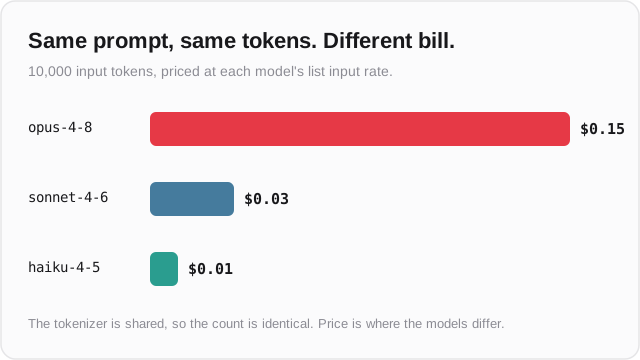
Here is the part I did not expect to enjoy so much. Every current Claude model shares one tokenizer, so the token count is identical across Opus, Sonnet, and Haiku. A naive comparison table would just print the same number three times. What actually differs is the price and the context window, so that is what the tool shows: the estimated input cost per model, and how much of each model's window your prompt fills. Give it a rough expected reply size and it also adds the output and total cost, which quietly turns it into a small budget planner.
How it is built
Under the hood it is a normal entry in this site's utilities hub: a client component for the form and a Next.js route for the count. The route resolves the Anthropic key the same way every other AI feature here does, rate-limits per IP, caps the input, and counts each selected model in parallel, so one bad model id degrades to a single error row instead of failing the whole request. The cost and context math is pure and unit-tested. As with the rest of the hub, the source is one click from the tool page if you want to read or fork it.
Get the next one
An occasional note when something genuinely new ships here — essays, free tools, projects. No schedule, no filler, easy out.
Need something like this built?
I design and ship AI tools, full-stack apps, and data pipelines — end to end, to production. Tell me the problem in a sentence; I'll give you an honest read on fit within a day.
Work with me →